
UEFI Boot Flow: from Reset Vector to ExitBootServices
Not memorizing phase names — learning boot flow to know where a machine is dying and which direction to debug. From SEC through Runtime, a map for real failure modes.
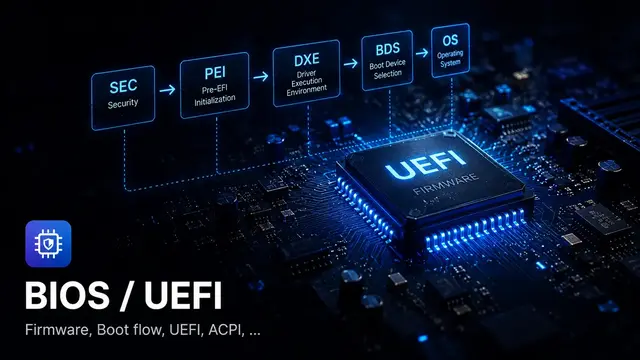
Some failures look identical from the outside: the machine powers on but the screen stays black; the vendor logo appears and then the system resets; the SSD shows up in setup but not in the boot menu; Windows Boot Manager is listed but selecting it just cycles back to the boot screen.
From a user’s perspective, all of these are just “the machine won’t boot.”
But for a firmware engineer, these failures live in completely different layers. Some die very early — before DRAM is even initialized. Some happen while firmware is loading drivers. Some only appear when BDS reads Boot#### from NVRAM. And some only show up at the final boundary when the OS loader calls ExitBootServices.
This is why learning UEFI boot flow isn’t about memorizing phase names. SEC, PEI, DXE, BDS, TSL, and Runtime only have meaning when you know what resources each phase has available, what part of the system it’s building, and what direction to debug when something fails there.
My work involves customizing BIOS for POS systems, kiosks, and payment terminals. A boot failure in that environment isn’t something you can sit on. If a machine dies at a store during peak hours, the first priority is determining fast: which phase is firmware dying in?
This article works through the flow from Reset Vector to ExitBootServices from exactly that angle. Not as a diagram to memorize — as a debug map.
Why the phase structure exists
The fundamental problem: when the CPU first resets, the system has almost nothing to work with. DRAM is not initialized, the chipset is not configured, there’s no stack in the conventional sense. Firmware cannot do everything at once.
UEFI solves this by dividing boot into phases, each building the foundation for the next:
Security Phase
CPU reset. Resources nearly zero. Establish temporary RAM so PEI can run
Pre-EFI Init
Initialize DRAM. Build the HOB list. Hand off platform data to DXE
Driver Execution
Load drivers. Publish protocols. Enumerate devices. Build the entire firmware ecosystem
Boot Device Select
Read BootOrder and Boot####. Resolve Device Path. Load the OS loader
Transient System Load
OS loader is running. Preparing to call ExitBootServices
Runtime Phase
OS has taken over. Only Runtime Services remain: variable, time, reset
The key thing to remember: failures in each phase manifest differently. You can’t debug BDS if the real problem is in PEI. And you can’t debug a DXE driver if the root cause is a bad HOB from PEI.
SEC: when the system has nothing yet
Immediately after a CPU reset, the system is in an extremely constrained state: DRAM is not initialized, a conventional stack does not exist. Firmware must start running under these conditions.
SEC does exactly one thing: establish the minimum environment for PEI to run.
Reset vector
  ↓
Set up Temporary RAM (cache-as-RAM or internal SRAM)
  ↓
Perform initial firmware verification if the platform requires it
  ↓
Transfer control to PEI Core
SEC doesn’t implement much policy. It’s the code that “clears the path” so PEI has somewhere to stand.
When to suspect SEC?
If the board dies very early — no POST codes, no serial log, reset loop from the very start. At that point only a POST code LED or hardware debug port provides information, because normal tooling isn’t available yet.
PEI: building the foundation for DXE
PEI builds the minimum infrastructure for DXE to run. The most important task: initialize DRAM. Without RAM available, firmware cannot load drivers, cannot create services, cannot do much more than the bare minimum.
Beyond memory init, PEI creates the HOB list (Hand-Off Blocks) — data structures describing the memory map, firmware volume locations, boot mode, and platform information to pass to DXE:
PEI builds HOB list:
├─ Memory Resource HOB: DXE knows where RAM is and how much
├─ Firmware Volume HOB: DXE dispatcher knows where to find drivers
├─ GUID HOB (platform-specific): board info, silicon, policy data
└─ Boot Mode: Normal / S3 Resume / Recovery
HOBs are the bridge between PEI and DXE. DXE knows nothing about the hardware except what PEI wrote into HOBs. If a HOB is missing or wrong, DXE may still start but with incorrect platform data underneath it.
When to suspect PEI?
- POST code stops in the PEI range
- Reset loop after memory training
- DXE starts but is missing drivers or resources — don’t rush to fix DXE; check the HOB list first
DXE: the driver and service ecosystem
After memory is available and the HOB list has the needed data, DXE Core starts building the UEFI ecosystem: loading drivers, creating the handle database, publishing protocols, enumerating devices.
The DXE Dispatcher scans firmware volumes, checks the DEPEX (dependency expression) of each driver, and only dispatches a driver when all the protocols it depends on are installed. This means dispatch order follows the dependency chain, not the order of files in the FV.
DXE Dispatcher loop:
  Scan FV → check DEPEX
  Protocol not yet installed: driver waits
  Protocol installed: dispatch → driver installs new protocol → unlocks waiting drivers
  Repeat until nothing left to dispatch → transition to BDS
When to suspect DXE?
A device not appearing in the boot menu doesn’t mean BDS is wrong. Check in order:
DXE debug checklist
BDS: from firmware to OS loader
BDS reads boot options from NVRAM, connects the needed devices, parses Device Paths, loads a .efi file, and hands control to the OS loader.
Each boot option is stored in NVRAM as a Boot#### variable:
BootOrder: 0000, 0001, 0002
Boot0000: Windows Boot Manager
  ├─ Device Path: HD(1,GPT,...)/File(\EFI\Microsoft\Boot\bootmgfw.efi)
  └─ Attributes: LOAD_OPTION_ACTIVE
Boot0001: UEFI Shell
Boot0002: PXE Boot
BDS reads BootOrder, tries each option in order. For each, it resolves the Device Path (connects the controller, finds the ESP), loads the .efi file, and calls StartImage().
When to suspect BDS?
SSD is recognized in DXE but Windows won’t boot. Before blaming Windows Boot Manager, check:
BDS debug checklist
TSL: the transition before OS takes over
TSL is the window after BDS has loaded the OS loader and it is running, but the OS hasn’t fully taken control yet. The bootloader is using UEFI services to read the kernel, prepare memory, and then call ExitBootServices().
ExitBootServices() is the point of no return. After this call, Boot Services are no longer valid and only Runtime Services remain.
TSL failures are among the hardest to debug because they happen at the boundary between firmware and OS:
// Bootloader must get the memory map and call ExitBootServices
// with the correct MapKey. If memory map changes between the two: fail.
GetMemoryMap(&MapSize, MemMap, &MapKey, ...);
// Do not allocate or free memory here
ExitBootServices(ImageHandle, MapKey);  // MapKey must match
When to suspect TSL?
- OS loader has started but the kernel never comes up
ExitBootServices()returnsEFI_INVALID_PARAMETER- Failure occurs after
StartImage()succeeds
Runtime: after the OS takes control
After ExitBootServices(), the OS kernel runs. UEFI Boot Services are gone, but Runtime Services can still be called from the OS if mapped correctly: reading and writing NVRAM variables, resetting the system, getting the system time.
On many platforms, the actual path for SetVariable is:
OS calls SetVariable("BootOrder", ...)
  ↓
Runtime Variable Service
  ↓ (many platforms)
SMM Variable Driver
  ↓
SPI flash write
For variable failures after the OS is running — particularly when efibootmgr writes seem to have no effect — you need to check the runtime variable path, the SMM variable driver, and SPI flash. For settings changed in Setup that disappear after reboot, you also need to check the HII save flow, NVRAM, and the consumer module.
Debugging by symptom
When a boot failure occurs, the first question is not “what’s the error?” but “which phase is dying?”:
| Symptom | Phase to suspect | What to check |
|---|---|---|
| No log, early reset loop | SEC | DRAM not initialized; only POST code LED or hardware trace available. |
| Stuck at PEI POST code, reset after memory training | PEI | Memory init, HOB list, PEI→DXE handoff. |
| Device not appearing in boot menu | DXE | Driver dispatch, DEPEX, Driver Binding, protocol chain. |
| Boot menu shows option but OS won't boot | BDS | BootOrder, Boot####, Device Path, LoadImage. |
| OS loader runs but kernel never comes up | TSL | ExitBootServices, memory map key, loader failure. |
| Setting saved but lost after reboot | Runtime / HII / NVRAM | Depends on whether changed from OS or from Setup UI. Check both Runtime path and HII save flow. |
Summary
UEFI boot flow is not a single main() function running from start to finish. It’s a chain of phases, each with its own environment, its own responsibilities, and its own failure modes.
Temporary RAM
CPU reset, build earliest environment, call PEI
Memory init
Initialize DRAM, build HOB list, hand off to DXE
Driver model
Dispatcher, protocols, handle database, driver binding
Boot option
BootOrder, Boot####, Device Path, LoadImage, StartImage
OS loader
GetMemoryMap, ExitBootServices
Runtime Services
NVRAM variable, time, reset, SMM path depending on platform
When debugging, the first step isn’t reading detailed source code — it’s identifying exactly where in this chain firmware is dying. Once you know the phase, you know which layer to look at and which to skip.
References
Read next
Each phase in this article has a more detailed note:
- What is SEC?
- What is PEI?
- What is DXE?
- What is the DXE Dispatcher?
- What is BDS?
- What is ExitBootServices?
- DXE Phase: Drivers, Protocols, and reading logs when nothing runs
- SMM in UEFI: System Management Mode from a debug perspective
Found this useful?
Save it or share it with someone learning firmware, BIOS/UEFI, and embedded systems.
Nội dung liên quan
Một số bài viết, ghi chú hoặc project có liên quan đến nội dung bạn vừa đọc.
DXE Phase: Drivers, Protocols, and reading logs when nothing runs
Deep dive into DXE: dispatcher, DEPEX, Driver Binding, protocol database, and how to use serial log, POST codes, and UEFI Shell to debug real failures.
How are BIOS and UEFI different?
Why does everyone say 'go into BIOS' when modern machines use UEFI? Covers BIOS, UEFI, boot flow, Secure Boot, Boot#### and how firmware builds the system before the OS runs.
What is Boot Failure Checklist?
Quick note explaining Boot Failure Checklist for BIOS/UEFI and embedded firmware readers.
Đọc thêm về BIOS/UEFI
Khám phá các bài viết về BIOS/UEFI, embedded firmware, debugging và system-level thinking.