Non-Blocking UART Logger on STM32 with DMA + Ring Buffer
Designing a non-blocking UART debug logger for STM32: avoiding printf blocking, handling lost logs with DMA, and using a ring buffer with DMA callbacks.
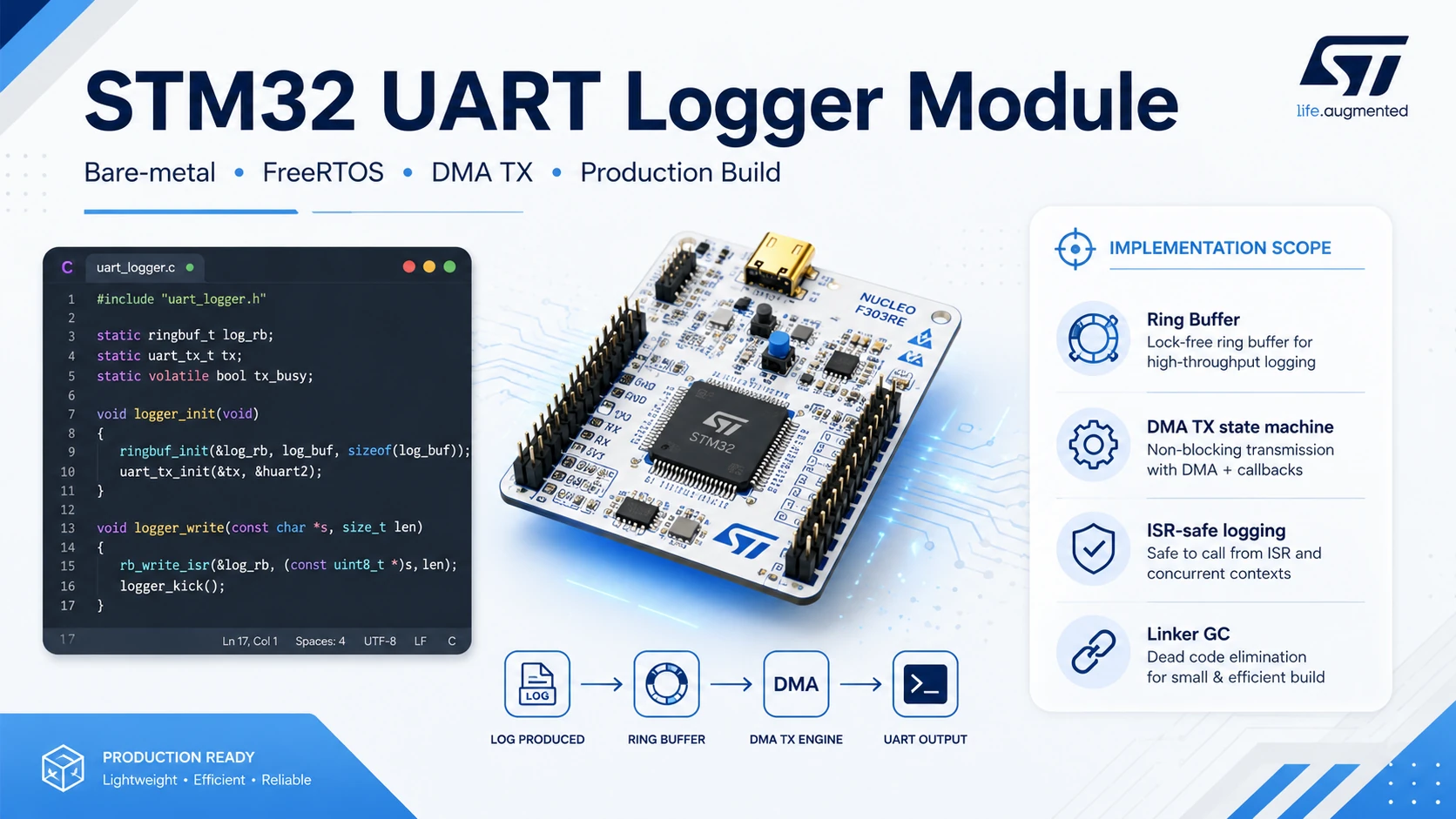
1. When printf() stops being your friend
If you think printf() is harmless, this post might change your mind.
In firmware, logging is something that’s easy to underestimate. Beginners use logs just to confirm the code is running. Experienced developers use logs to catch timing issues, bus state, host commands, raw sensor data, or those intermittent bugs that breakpoints never seem to catch. Honestly, debugging firmware without logs sometimes feels like walking through a dark room holding nothing but a screwdriver.
But logging has a dark side too.
On a project that read magnetic stripe card data, I needed to dump a few hundred raw bits after each swipe to compare against a dedicated analyzer. With logging off, the data decoded correctly. With logging on, the data started drifting, the processing order went wrong, and at one point I even suspected the interrupt that read the signal itself was broken.
After a few rounds of doubting my own sanity, I realized the culprit wasn’t the decode algorithm. The culprit was the very log line I’d added “just to be sure.”
printf() wasn’t wrong. The way I was piping printf() out over UART was the problem.
This post isn’t just about redirecting printf() to UART. It goes deeper into how to design a proper logger for STM32: one with a queue, DMA, and a policy for when the buffer fills up.
The entire architecture in this post has been implemented and measured for real on a NUCLEO-G0B1RE. The full code, the .c/.h module structure, the CubeMX configuration, and real test evidence (normal, blocking, spam, buffer full) live in a dedicated project: STM32 Non-Blocking UART Logger.
2. The big picture: a logger isn’t just one redirect line
A non-blocking UART logger should be thought of as a pipeline:
Application / Task / ISR
  ↓
Logger API
  ↓
Temporary formatting buffer or raw string
  ↓
Ring Buffer in RAM
  ↓
DMA TX engine
  ↓
UART TX pin
  ↓
USB-UART / TeraTerm / logic analyzer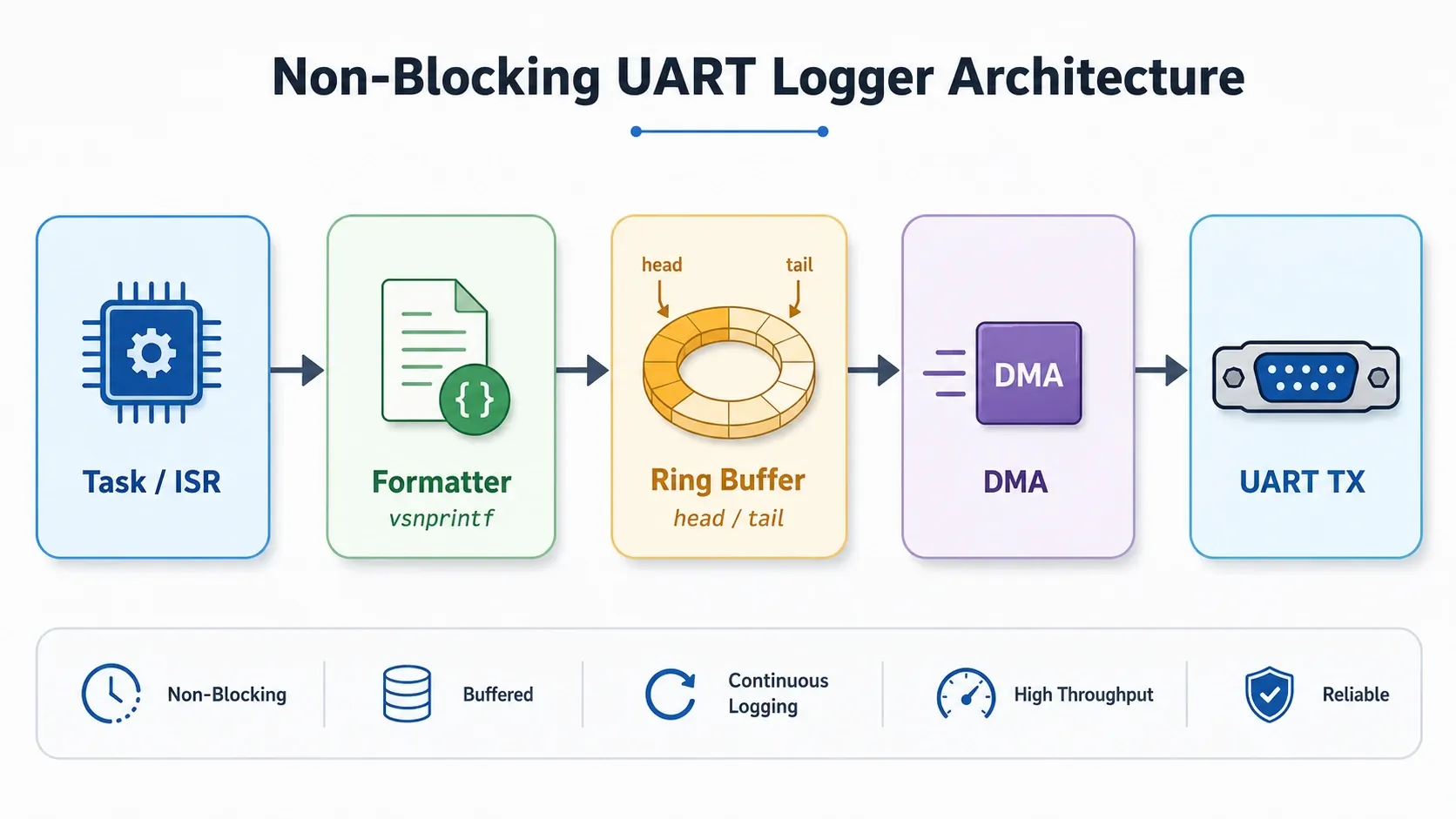
In this architecture:
- printf() or LOG_INFO() only format/assemble the message.
- The Ring Buffer acts as a queue between the fast CPU and the slow UART.
- DMA transmits data over UART in the background.
- The DMA/UART callback pulls the next pending chunk out of the buffer.
In short: a UART logger shouldn’t be a string-printing function. It should be a small producer-consumer system living inside the firmware.
Further reading: The producer-consumer pattern in embedded logging systems.
3. How does default printf() redirection actually work?
In STM32CubeIDE using GCC/newlib or newlib-nano, the most common way to send printf() over UART is to override _write():
int _write(int file, char *ptr, int len){ HAL_UART_Transmit(&huart1, (uint8_t *)ptr, len, HAL_MAX_DELAY); return len;}The idea is that the C library handles the format string first, then calls the _write() syscall to write bytes to the output. On bare-metal firmware, we decide ourselves what that output is: UART, SWO, semihosting, USB CDC, or some other debug channel.
The dangerous line is this one:
HAL_UART_Transmit(&huart1, (uint8_t *)ptr, len, HAL_MAX_DELAY);HAL_UART_Transmit() is a polling/blocking transmit API. The CPU has to wait until UART finishes transmitting or a timeout occurs. During that time, the rest of your code doesn’t run.
3.1 Overriding _write() alone isn’t always enough to make printf() work
Before we even get to the blocking issue, there’s an earlier bug: you override _write() correctly, but printf() still doesn’t work, or crashes on the very first call.
The reason is that printf() in Newlib doesn’t just call _write(). Internally, it also calls malloc() to allocate a temporary formatting buffer. And malloc() needs another syscall, _sbrk(), to grow the heap. If the firmware hasn’t implemented _sbrk(), this call chain breaks right at malloc(), before it ever reaches UART.
void *_sbrk(int incr){ extern uint8_t _end; /* symbol marking the end of the static RAM region, defined by the linker script */ static uint8_t *heap_end = NULL; uint8_t *prev_heap_end; if (heap_end == NULL) { heap_end = &_end; } prev_heap_end = heap_end; heap_end += incr; return prev_heap_end;}3.2 UART is much slower than it feels
With a common UART configuration of 115200 bps, a single byte typically goes through this frame:
1 start bit + 8 data bits + 1 stop bit = 10 bitsTime to transmit one byte:
10 / 115200 ≈ 86.8 µsConverted into a more memorable unit: that’s roughly 11.5 bytes/ms, a number that will come back several times when sizing the buffer in the hands-on section.
If a log line is 60 characters long:
60 x 86.8 µs ≈ 5.2 ms5.2 ms doesn’t sound like much if you’re writing a desktop app. But in firmware, that can be an entire lifetime for the system:
| Component | Typical time budget |
|---|---|
| FreeRTOS tick | 1 ms |
| Fast sensor read loop | tens to a few hundred µs |
| USB full-speed SOF | 1 ms |
| Certain interrupt handlers | need to finish as fast as possible |
| Watchdog | may reset if the flow stalls too long |
So a seemingly harmless log line can introduce jitter, make a task miss its deadline, overflow a peripheral buffer, or send you debugging in the wrong direction.
Further reading: How to calculate UART transmit time from baud rate.
3.3 When a bug only shows up with logging turned on
This is a particularly annoying class of bug:
Logging off → the system works correctly
Logging on  → the system misbehaves
Set a breakpoint → the bug disappears
Go home for the night → the bug comes back
On the magstripe project, I wanted to dump raw bits for comparison. The intent was perfectly reasonable: more raw data means more accurate analysis.
But because I was dumping too much data over a blocking UART call, the firmware slowed down right at the moment the processing pipeline needed to hold its timing. The result was that logging itself changed the system’s behavior.
This is the first lesson: a debugging method shouldn’t distort system behavior too much. The closer your logging is to a timing-critical path, the more careful you need to be.
4. Why switching to DMA “for speed” still isn’t enough
After discovering that polling UART blocks the CPU, the natural reflex is to switch to DMA:
int _write(int file, char *ptr, int len){ HAL_UART_Transmit_DMA(&huart1, (uint8_t *)ptr, len); return len;}At first glance, this looks great:
- The CPU doesn’t sit and wait byte by byte.
- DMA transmits in the background.
- Minimal code changes.
- The terminal still shows logs.
But this is still an architectural mistake.
DMA is not a queue. DMA only takes a memory region, transmits it, then reports completion. While DMA is still transmitting, if you call HAL_UART_Transmit_DMA() again, HAL may return HAL_BUSY. If you ignore the return value, the next log silently disappears without telling you.
printf("ABC")
  ↓
_write("A") → DMA start → OK
_write("B") → DMA busy  → HAL_BUSY → "B" is lost
_write("C") → DMA busy → HAL_BUSY → "C" is lostRelated reading: When does HAL_BUSY happen in UART DMA?.
4.1 An even more common mistake: transmitting character-by-character with polling
Some tutorials redirect printf() like this:
int __io_putchar(uint8_t ch){ HAL_UART_Transmit(&huart2, &ch, 1, 0xFFFF); return ch;}int _write(int file, char *ptr, int len){ for (int i = 0; i < len; i++) { __io_putchar((uint8_t)*ptr++); } return len;}This is easy to understand and easy to get running, but extremely expensive:
- every character triggers one HAL_UART_Transmit() call;
- every transmit is a polling wait;
- a 60-character line turns into 60 small blocking stalls;
- the total time is still bounded by the UART baud rate;
- function call/state-check overhead adds up on top.
It’s fine for a Hello World on a freshly unboxed board, but it doesn’t belong in firmware with real timing constraints.
5. The right architecture: decoupling CPU speed from UART speed
The core problem is that the CPU generates logs faster than UART can transmit them. So we need a buffering layer in between.
Producer: CPU / task / ISR generating logs
Buffer  : a Ring Buffer in RAM
Consumer: DMA + UART transmitting logs out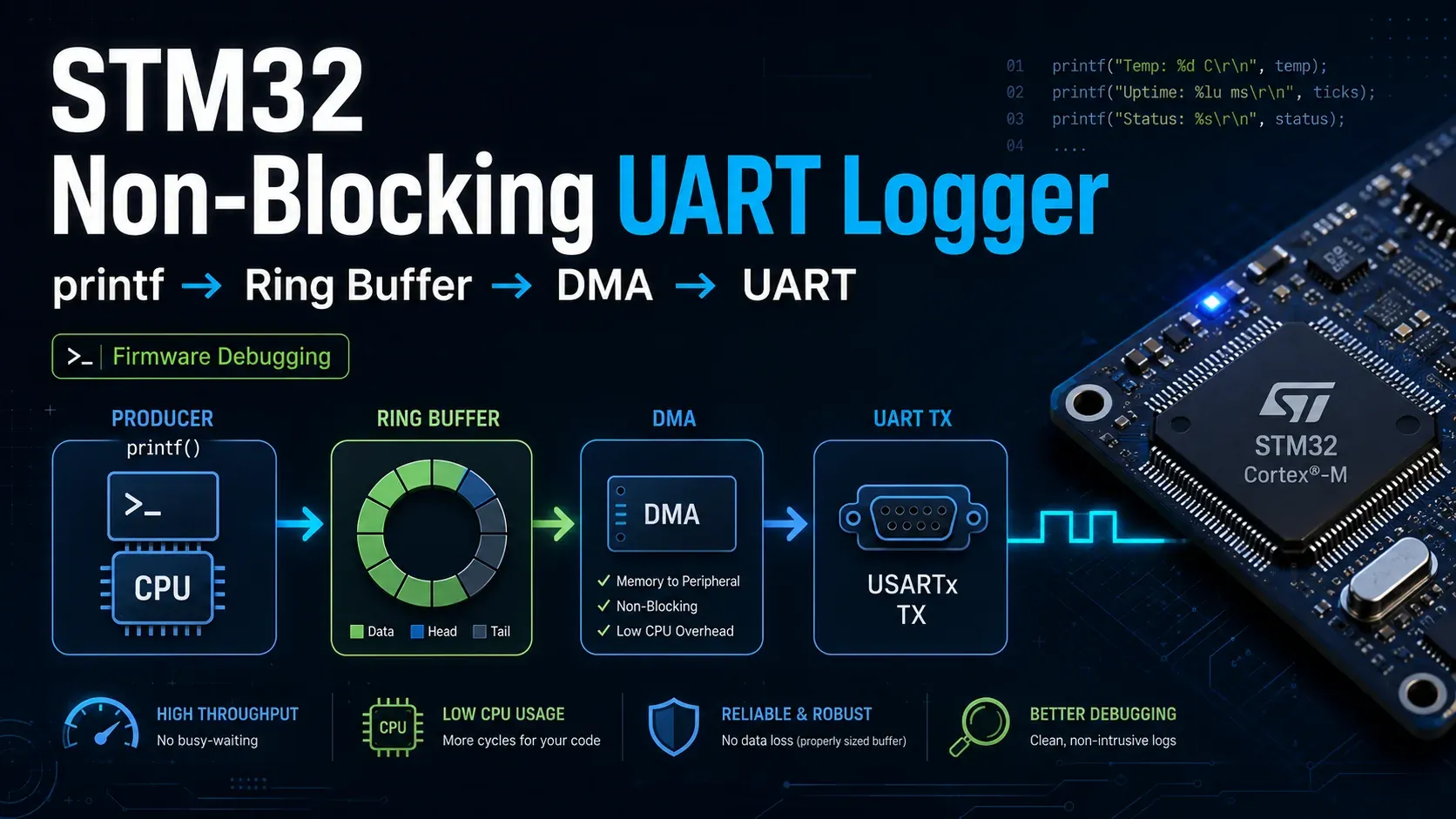
A design mindset shift
Don’t ask “how do I make printf() call DMA.” Ask “where does the log wait if UART is busy.”
Once you ask the question that way, the Ring Buffer shows up almost on its own.
A minimal architecture needs five parts:
| Component | Responsibility |
|---|---|
| Logger API | Receives messages from application/task/ISR |
| Format buffer | Assembles a format string into one complete message |
| Ring Buffer | Holds logs waiting to be transmitted |
| DMA TX engine | Starts DMA whenever UART is free |
| TX complete callback | Updates tail, clears the busy state, sends the next pending chunk |
Further reading: What is a Ring Buffer in embedded firmware?.
6. The Ring Buffer in a logger: easy to write, easy to get wrong
A Ring Buffer uses a fixed array plus two indices:
head = where the next byte gets written
tail = where the next byte gets read/transmitted from
The usual convention:
head == tail       → buffer is empty
next(head) == tail → buffer is full
Since head == tail already means “empty,” we typically sacrifice one byte of capacity to distinguish empty from full.
#define LOG_RING_SIZE 2048Ustatic uint8_t ring[LOG_RING_SIZE];static volatile uint32_t head = 0;static volatile uint32_t tail = 0;static uint32_t rb_next(uint32_t index){ return (index + 1U) % LOG_RING_SIZE;}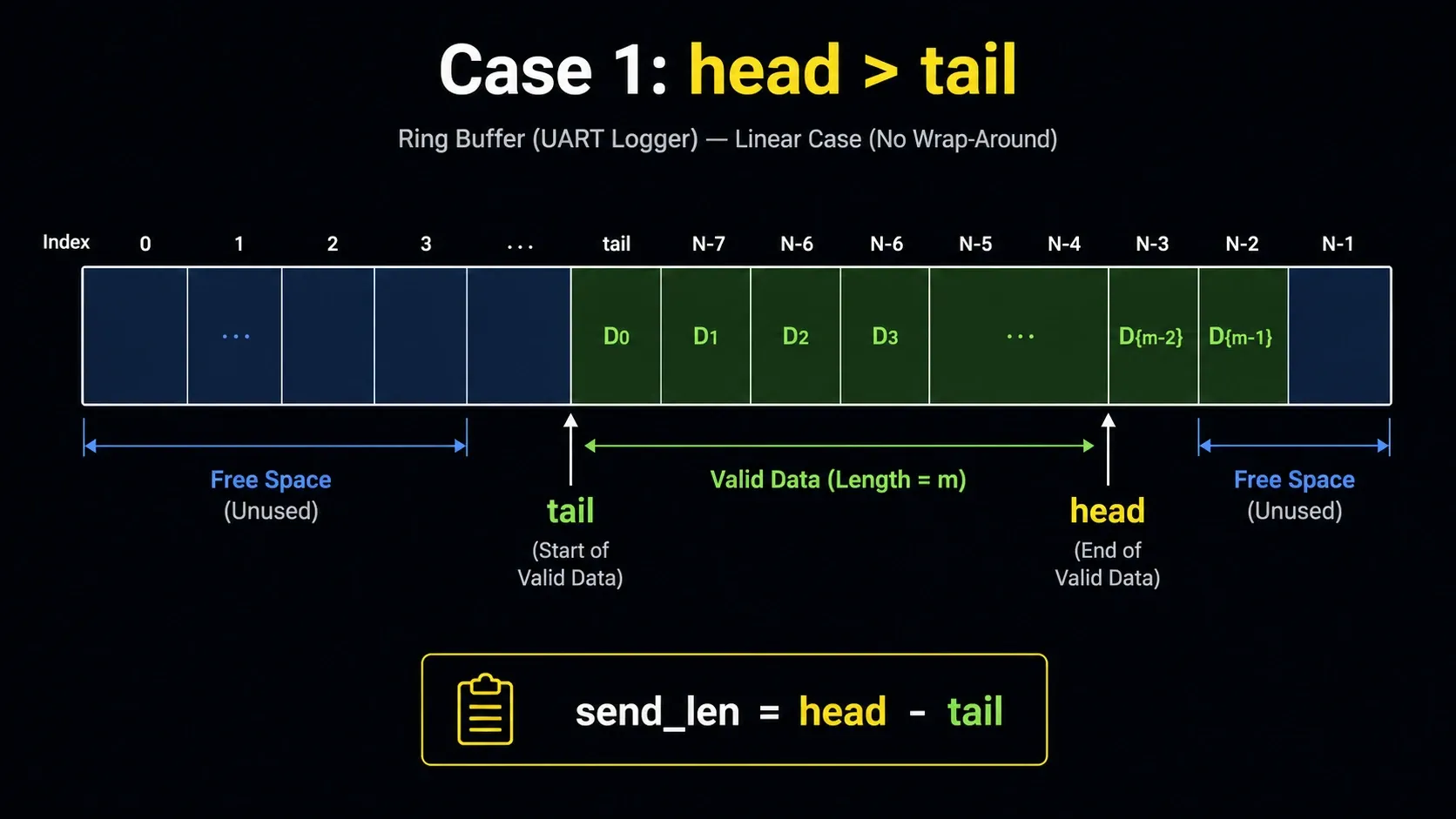
Case 1: contiguous data, DMA can send one straight chunk
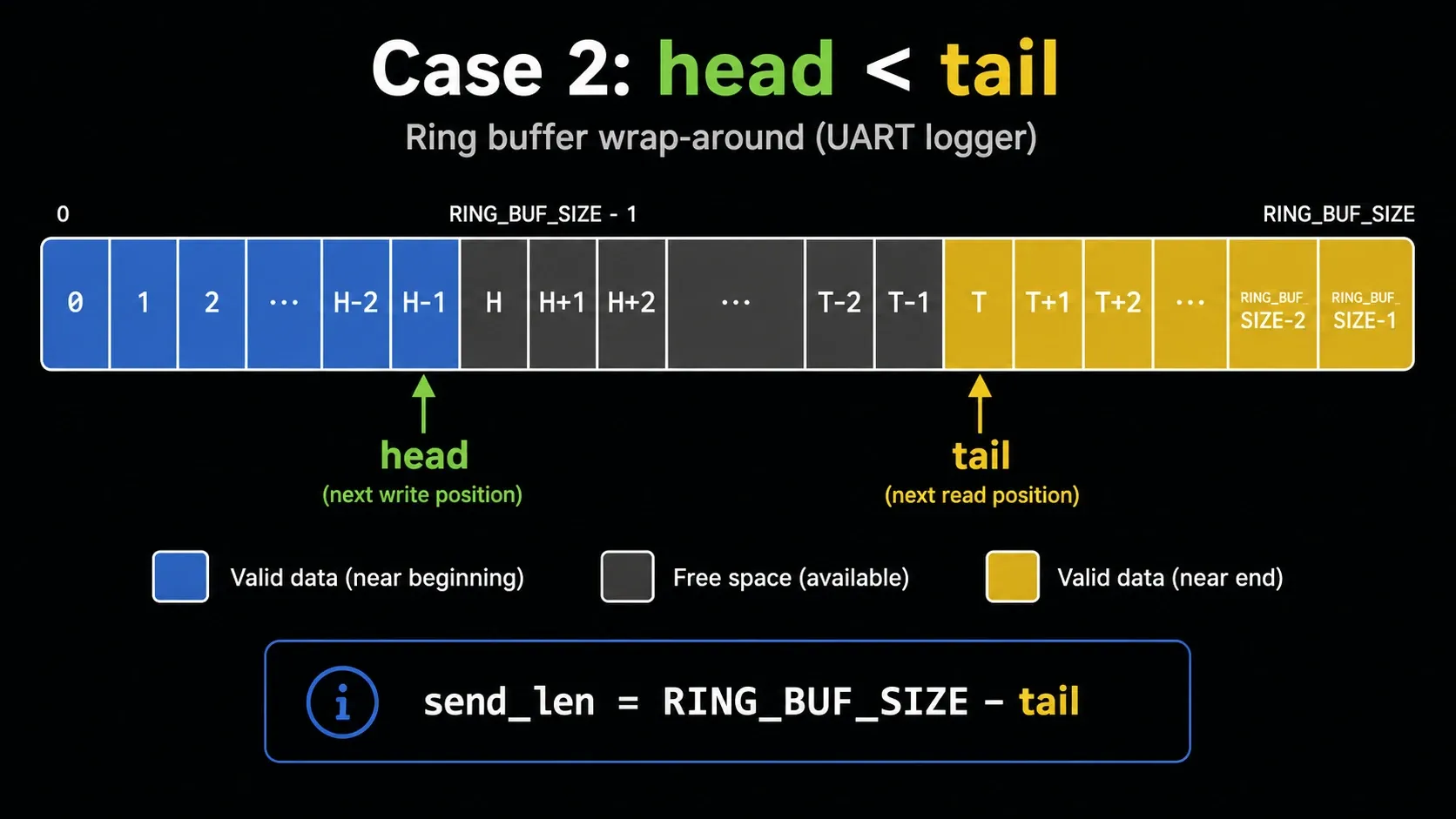
Case 2: wrapped data, DMA should send the tail → end portion first
6.1 Free space: what decides whether you accept or drop a log
A common formula:
static uint32_t rb_used(void){ if (head >= tail) { return head - tail; } return LOG_RING_SIZE - tail + head;}static uint32_t rb_free(void){ return LOG_RING_SIZE - rb_used() - 1U;}If a message is longer than the free space, you have to pick a policy: drop the byte, drop the message, overwrite old logs, block and wait, or prioritize certain logs over others. Not choosing a policy is also a policy, and usually the worst one.
The hands-on project measures exactly how much a 2KB buffer can absorb before it fills up, along with the formula for burst capacity versus sustained rate. See details in the buffer sizing section of the project.
6.2 A serious trap: the callback must never do tail = head
This is a bug I want to call out specifically, because it looks perfectly reasonable but can silently lose logs.
Suppose DMA is currently transmitting the segment from tail to tail + tx_len. While DMA is transmitting, another task writes more logs into the buffer, advancing head. If the callback does this:
// Wrong in many casesvoid HAL_UART_TxCpltCallback(UART_HandleTypeDef *huart){ tail = head; dma_busy = 0;}then the callback can jump tail past data that was written while DMA was still busy. In other words: new data that DMA never actually sent gets marked as already sent.
The log disappears cleanly, cleanly enough to make it genuinely hard to debug.
The correct approach is to record the length of the chunk being transmitted when DMA starts, then have the callback advance tail by exactly that length:
static volatile uint8_t dma_busy = 0;static volatile uint32_t dma_tx_len = 0;static uint32_t rb_contiguous_len(void){ if (head >= tail) { return head - tail; } return LOG_RING_SIZE - tail;}static void logger_kick_tx(void){ uint32_t primask = __get_PRIMASK(); __disable_irq(); if (dma_busy || (head == tail)) { __set_PRIMASK(primask); return; } uint32_t start = tail; uint32_t len = rb_contiguous_len(); dma_busy = 1U; dma_tx_len = len; __set_PRIMASK(primask); if (HAL_UART_Transmit_DMA(&huart1, &ring[start], len) != HAL_OK) { primask = __get_PRIMASK(); __disable_irq(); dma_busy = 0U; dma_tx_len = 0U; __set_PRIMASK(primask); }}void HAL_UART_TxCpltCallback(UART_HandleTypeDef *huart){ if (huart->Instance != USART1) { return; } uint32_t primask = __get_PRIMASK(); __disable_irq(); tail = (tail + dma_tx_len) % LOG_RING_SIZE; dma_tx_len = 0U; dma_busy = 0U; __set_PRIMASK(primask); logger_kick_tx();}A more complete module (split into .c/.h, with a dropped counter, tested with real spam-log and buffer-full scenarios on the board) appears in the hands-on section at the end of this post.
7. What do you do when the buffer fills up?
This is the question every real product eventually has to answer. No matter how good the design is, the Ring Buffer can still fill up:
- logs are generated faster than UART can transmit them;
- the baud rate is too low;
- a task is spamming logs inside a tight loop;
- an ISR is logging too much;
- you’re dumping a large block of raw data;
- the terminal or USB-UART adapter can’t keep up.
When the buffer fills up, you have a few options.
The theory below is backed by real numbers from the hands-on project: with a 2KB buffer and UART at 115200 bps, the system can absorb a burst of about 28 messages before it starts dropping. See the real log in Test 4: Buffer full.
7.1 Drop byte: simple, but logs can come out garbled
if (next == tail) { dropped_bytes++; return false;}Pros:
- simple;
- doesn’t block the CPU;
- works well for hard real-time;
- the main system keeps running.
Cons:
- a message can get cut off mid-way;
- logs become hard to read;
- a log parser can get thrown off.
7.2 Drop message: lose a whole line, but keep the log clean
This policy checks for enough space before writing. If there isn’t enough, it drops the entire message:
free_space >= message_len → write the whole message
free_space <  message_len → drop the whole message
Pros:
- no garbled lines;
- easy to read;
- easy to analyze with a script;
- well suited to real-world firmware debugging.
Cons:
- long messages are more likely to get dropped;
- you need a counter to know how much was lost.
This is the policy I usually pick for a basic logger: losing one line is much easier to live with than losing half a sentence. It’s also the policy implemented in the hands-on project, with a dropped counter measured directly through the spam and buffer-full tests.
7.3 Block and wait for UART: only use this as a temporary debugging crutch
Blocking until the buffer drains sounds like it avoids losing logs, but it drags you right back to the original problem: logging breaks timing.
In a system with multiple concurrent contexts, blocking in the wrong place can also cause deadlocks or priority inversion. And inside an ISR, it’s even less acceptable.
8. A design checklist for STM32 UART loggers
Pinning this checklist to the top of a project probably won’t hurt.
Architecture
Timing
Buffer full
9. From idea to firmware that actually runs
A beautiful architecture on paper doesn’t always survive contact with real firmware.
The same goes for a UART logger. The core idea sounds simple enough: printf() writes into _write(), _write() pushes the log into a Ring Buffer, and UART TX DMA pulls chunks out of the buffer to transmit. When DMA finishes, the callback checks whether there’s more data waiting.
But once you actually start coding, you immediately run into very practical questions:
- How should UART and DMA be configured in CubeMX?
- How big should the buffer be?
- If logs arrive faster than UART can send them, what happens?
- How should the callback be written so it doesn’t lose logs?
The hands-on project answers each of these questions with real code and measurements taken on the board, not just theory.
In short: this blog post helps you understand the design, and the project helps you bring that design down to a real STM32 board and see the actual numbers.
10. Related documentation and notes
Notes in this system
- What does redirecting printf with _write() on STM32 actually mean?
- How exactly does HAL_UART_Transmit() block?
- How to calculate UART transmit time from baud rate
- When does HAL_BUSY happen in UART DMA?
- What is a Ring Buffer in embedded firmware?
- How do DMA Normal mode and Circular mode differ?
Hands-on project
External technical references
11. Conclusion: logging is part of your firmware architecture
When you’re new to STM32, you might think UART logging is a side concern. Getting printf() redirected to UART feels like enough of a win on its own.
But the more real firmware you build, the more you realize logging isn’t a side concern at all.
A log can help you catch a bug that’s eaten several days of your life. But a log can also create a brand-new bug if it blocks the CPU, shifts your timing, or makes DMA return HAL_BUSY.
A good UART logger needs to answer:
What path does a log travel through?
If UART is busy, where does the log wait?
If the buffer is full, what gets dropped?
Does the callback update its state correctly?
If you can answer those questions, you’re not just printing text to a terminal. You’re designing a small but genuinely important piece of your firmware system.
The next part of this series will cover RTOS task/ISR context, advanced policies like double buffering and priority logging, and how to make debug logging disappear completely from a production build. That part needs its own hands-on project so every claim has measured evidence, the same way this post did with Project 01.
Found this article useful?
Share, give feedback, or support if you find this content valuable.